LDAPMessage structures.
Note that in order to receive search references from the Netscape Directory Server 3.0, you must identify your client as an LDAP v3 client. If you do not, the server will return the LDAP error code LDAP_PARTIAL_RESULTS and a set of referrals. See "Specifying the LDAP Version of Your Client" for details.
The Netscape Directory SDK for C provides functions that allow you to search the directory and retrieve results from the server:
ldap_search_ext_s() or the asynchronous function ldap_search_ext(). ldap_result() to get each result (an LDAPMessage structure) and determine what type of result (entry or search reference) was sent from the server. ldap_first_message() and ldap_next_message() to iterate through the results in the chain. ldap_first_entry() and ldap_next_entry().
If you are just interested in search references, you can call ldap_first_reference() and ldap_next_reference(). LDAPMessage structure), call ldap_first_entry(). LDAPMessage structure), call ldap_parse_reference().LDAPMessage structure), call ldap_parse_result(). ldap_search_ext_s() or ldap_search_ext():
ldap_search_ext_s() is a synchronous function. This function blocks until all results have been received from the server. ldap_search_ext() is an asynchronous function. This function sends an LDAP search request to the server. You can do other work while periodically checking to see if the server has returned any results. LDAP_API(int) LDAP_CALL ldap_search_ext( LDAP *ld, const char *base,
int scope, const char *filter, char **attrs, int attrsonly,
LDAPControl **serverctrls, LDAPControl **clientctrls,
struct timeval *timeoutp, int sizelimit, int *msgidp );
LDAP_API(int) LDAP_CALL ldap_search_ext_s( LDAP *ld, const char *base,For either function, you specify the search criteria using the following arguments:
int scope, const char *filter, char **attrs, int attrsonly,
LDAPControl **serverctrls, LDAPControl **clientctrls,
struct timeval *timeoutp, int sizelimit, LDAPMessage **res );
base specifies the starting point in the directory, or the base DN (an entry where to start searching) scope specifies the scope of the search (which entries you want to search) filter specifies a search filter (what to search for)attrs and attrsonly specify the type of information that you want return (which attributes you want to retrieve) and whether you want to retrieve only the attribute type or the attribute type and its values attrsonly argumentserverctrls and clientctrls specify the LDAP v3 controls associated with this search operation timeoutp and sizelimit specify the search constraints that you want applied to this search
Figure 6.1 Search criteria for an LDAP search operation
base argument) is the DN of the entry that serves as the starting point of the search.
To specify the scope of the search, you pass one of the following values as the scope parameter:
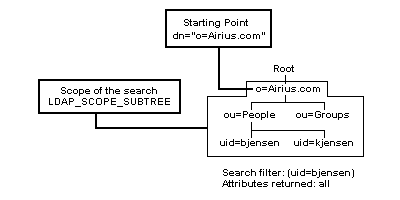
LDAP_SCOPE_SUBTREE searches the base entry and all entries at all levels below the base entry (as illustrated in Figure 6.2).
Figure 6.2 Example of a search with the scope LDAP_SCOPE_SUBTREE
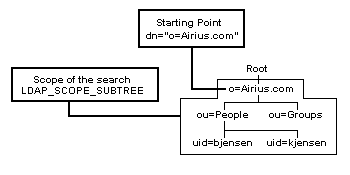
LDAP_SCOPE_ONELEVEL searches all entries at one level below the base entry (as illustrated in Figure 6.3). The base entry is not included in the search. Use this setting if you just want a list of the entries under a given entry. (See "Listing Subentries" for an example.)
Figure 6.3 Example of a search with the scope LDAP_SCOPE_ONELEVEL
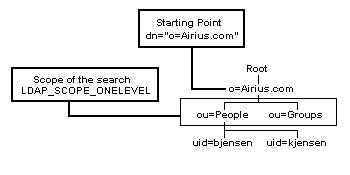
LDAP_SCOPE_BASE searches only the base entry. Use this setting if you just want to read the attributes of the base entry (as illustrated in Figure 6.4). (See "Reading an Entry" for an example.)
Figure 6.4 Example of a search with the scope LDAP_SCOPE_BASE
(attribute operator value)Here is a simple example of a search filter:
(cn=Barbara Jensen)In this example,
cn is the attribute, = is the operator, and Barbara Jensen is the value. The filter finds entries with the common name Barbara Jensen
For a listing of valid attributes that you can use in your search filter, see the documentation for the LDAP server. (For information on the attributes in the schema for the Netscape Directory Server, see the Administrator's Guide.)
Table 6.1 lists the valid operators you can use. Table 6.1 Basic operators for search filters
a is less than the value z. For example, the following filter finds all entries with last names beginning with a through jensen:
(sn<=jensen)Using Boolean operators and parentheses, you can combine different sets of conditions. Here is the syntax for combining search filters:
( boolean_operator (filter1)(filter2)(filter3) )Table 6.2 lists the valid boolean operators you can use.
Table 6.2 Boolean operators for search filters
| Boolean Operator |
Description
&
| | Returns entries matching one or more of the filter criteria. !
(!(filter))
(!(filter1)(filter2))
| |
|---|
Jensen or the last name Johnson:
(|(sn=Jensen)(sn=Johnson))You can also include wildcards to search for entries that start with, contain, or end with a given value. For example, you can use this filter to search for all entries whose names begin with the letter F:
(givenName=F*)
attrs argument, you can either retrieve all attributes in entries returned by the search, or you can specify the attributes that you want returned in the search results. For example, you can specify that you want to return the following attributes:
attrs argument. For example, to return only email addresses and phone numbers (by passing the NULL-terminated array { "mail", "telephoneNumber", NULL } as the attrs argument. NULL as the attrs argument. LDAP_NO_ATTRS as the attrs argument. NULL for the attrs argument to retrieve all of the attributes in entries found by the search, the operational attribute creatorsName will not be returned to your client. You need to explicitly specify the creatorsName attribute in the attrs argument.
To return all attributes in an entry and selected operational attributes, pass a NULL-terminated array containing LDAP_ALL_USER_ATTRS and the names of the operational attributes as the attrs argument.
The following table lists some of the operational attributes and the information they contain. Table 6.3 Information available in operational attributes
| Attribute Name |
Description of Values
|
|
| Distinguished name (DN) of the user who added the entry to the directory. Distinguished name (DN) of the user who last modified the entry. Distinguished name (DN) of the subschema entry, which controls the schema for this entry. (See "Getting Schema Information" for details.) |
|---|
timeoutp and sizelimit arguments of the ldap_search_ext_s() or ldap_search_ext() functions.
Note the following:
timeval structure with tv_sec = tv_usec = 0, and pass a pointer to this as the timeoutp argument. LDAP_OPT_TIMELIMIT preference for this connection, pass NULL as the timeoutp argument. LDAP_NO_LIMIT as the sizelimit argument. ldap_set_option() and set the LDAP_OPT_SIZELIMIT and LDAP_OPT_TIMELIMIT options. If you do not want to specify a limit (basically, no limit), set the value of the option to LDAP_NO_LIMIT.
Note that the LDAP server may already have time and size constraints set up that you cannot override.
The following example sets these session preferences so that a search returns no more than 100 entries and takes no more than 30 seconds.
#include <stdio.h>
#include "ldap.h"
...
LDAP *ld;
int max_ret, max_tim;
char *host = "localhost";
...
/* Initialize a session with the LDAP server ldap.netscape.com:389. */
if ( ( ld = ldap_init( host, LDAP_PORT ) ) == NULL ) { perror( "ldap_init" );
return( 1 );
}
/* Set the maximum number of entries returned. */
max_ret = 100;
ldap_set_option(ld, LDAP_OPT_SIZELIMIT, (void *)&max_ret );
/* Set the maximum number of seconds to wait. */
max_tim = 30;
ldap_set_option( ld, LDAP_OPT_TIMELIMIT, (void *)&max_tim );
...
...
#include <stdio.h>
#include "ldap.h"
...
#define BASEDN "o=Airius.com"
#define SCOPE LDAP_SCOPE_SUBTREE
#define FILTER "(sn=Jensen)"
...
LDAP *ld;
int msgid, rc;
...
/* Send the search request. */
rc = ldap_search_ext( ld, BASEDN, SCOPE, FILTER, NULL, 0, NULL,
NULL, NULL, LDAP_NO_LIMIT, &msgid );
if ( rc != LDAP_SUCCESS ) {fprintf( stderr, "ldap_search_ext: %s\n", ldap_err2string( rc ) );
ldap_unbind( ld );
return( 1 );
}
...
LDAPMessage structures. Each structure contains an entry, a search reference, or an LDAP result code. Because the results are represented as a chain, you should not free individual LDAPMessage structures within the chain. (When you are done working with the results, you can free the chain itself, rather than individual structures within the chain.)
To access data from entries found by the search, you need to follow this general process:
Figure 6.5 Search results in terms of entries, attributes, and values
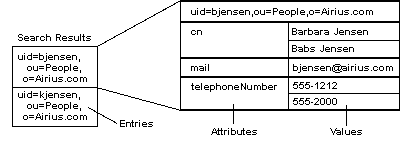
ldap_search_ext_s() function to search the directory synchronously, the function blocks until all results have been received. The function returns a chain of the results in the result parameter (a handle to an LDAPMessage structure).
You can iterate through the results in this chain by calling different API functions. See the section "Iterating Through a Chain of Results" for details.
ldap_search_ext() instead, you need to call ldap_result() to determine if the server sent back any results:
LDAP_API(int) LDAP_CALL ldap_result( LDAP *ld, int msgid, int all,You can specify how you want to get the results:
struct timeval *timeout, LDAPMessage **result );
LDAP_MSG_ONE as the all argument. LDAP_MSG_ALL as the all argument. LDAP_MSG_RECEIVED as the all argument. LDAP_MSG_ALL or LDAP_MSG_RECEIVED, the function passes back a chain of search results as the result argument. For details on how to retrieve the results from this chain, see "Iterating Through a Chain of Results".
If specify LDAP_MSG_ONE, the function passes back a single search result as the result argument. The function normally returns the type of the first search result; in this case, since only one result is returned, the function returns the type of that result. A search result can be one of the following types:
To determine what type of result was returned, call the ldap_msgtype() function. A search result can be one of the following types:
LDAP_RES_SEARCH_ENTRY indicates that the result is an entry found in the search. LDAPMessage structure representing the entry to the ldap_get_dn() function to get the DN of the entry or the ldap_first_attribute() and ldap_next_attribute() functions to get the attributes of the entry.
For details, see "Getting Distinguished Names for Each Entry" and "Getting Attributes from an Entry". LDAP_RES_SEARCH_REFERENCE indicates that the result is a search reference found within the scope of the search. LDAPMessage structure representing the search reference to the ldap_parse_reference() function to get the referrals (LDAP URLs) to other servers.
For details, see "Getting Referrals from Search References". LDAP_RES_SEARCH_RESULT indicates that the result is the final result sent by the server to indicate the result of the LDAP search operation. LDAPMessage structure representing the result to the ldap_parse_result() function to get the LDAP result code for the search operation. (For a list of possible result codes for an LDAP search operation, see the result code documentation for the ldap_search_ext_s() function.)
For details, see "Getting the Information from an LDAPMessage Structure". LDAP_PARTIAL_RESULTS and a set of referrals. See "Specifying the LDAP Version of Your Client" for details.
The following section of code gets results one at a time and checks the type of result.
...
#include <stdio.h>
#include "ldap.h"
...
#define BASEDN "o=Airius.com"
#define SCOPE LDAP_SCOPE_SUBTREE
#define FILTER "(sn=Jensen)"
...
LDAP *ld;
LDAPMessage *res;
int msgid, rc, parse_rc, finished = 0;
struct timeval zerotime;
zerotime.tv_sec = zerotime.tv_usec = 0L;
...
/* Send the LDAP search request. */
rc = ldap_search_ext( ld, BASEDN, SCOPE, FILTER, NULL, 0, NULL, NULL,
NULL, LDAP_NO_LIMIT, &msgid );
...
/* Poll the server for the results of the search operation. */
while ( !finished ) {rc = ldap_result( ld, msgid, LDAP_MSG_ONE, &zerotime, &res );
switch ( rc ) {case -1:
/* An error occurred. */
...
case 0:
/* The timeout period specified by zerotime was exceeded. */
...
case LDAP_RES_SEARCH_ENTRY:
/* The server sent one of the entries found by the search. */
...
case LDAP_RES_SEARCH_REFERENCE:
/* The server sent a search reference .*/
...
case LDAP_RES_SEARCH_RESULT:
/* Parse the final result received from the server. */
...
}
...
}
...
LDAPMessage structures. Each entry and search reference is contained in an LDAPMessage structure. The final result code of the LDAP search operation is also contained in one of these structures.
To retrieve results from a chain of search results, you can call one of the following sets of functions:
ldap_first_message() and ldap_next_message(). Both of these functions return a pointer to an LDAPMessage structure that represents an entry, search reference, or LDAP result code. ldap_count_messages().ldap_first_entry() and ldap_next_entry(). Both of these functions return a pointer to an LDAPMessage structure that represents an entry.ldap_count_entries().ldap_first_reference() and ldap_next_reference(). Both of these functions return a pointer to an LDAPMessage structure that represents a search reference.ldap_count_references().LDAPMessage structure is part of a chain and can point to other structures in the chain. You should not attempt to free individual LDAPMessage structures from memory; you may lose the rest of the results if you do this.
If you are iterating through each result, you can determine the type of the result by calling the ldap_msgtype() function. A search result can be one of the following types:
LDAP_RES_SEARCH_ENTRY indicates that the result is an entry found in the search. LDAPMessage structure representing the entry to the ldap_get_dn() function to get the DN of the entry or the ldap_first_attribute() and ldap_next_attribute() functions to get the attributes of the entry.
For details, see "Getting Distinguished Names for Each Entry" and "Getting Attributes from an Entry". LDAP_RES_SEARCH_REFERENCE indicates that the result is a search reference found within the scope of the search. LDAPMessage structure representing the search reference to the ldap_parse_reference() function to get the referrals (LDAP URLs) to other servers.
For details, see "Getting Referrals from Search References". LDAP_RES_SEARCH_RESULT indicates that the result is the final result sent by the server to indicate the result of the LDAP search operation. LDAPMessage structure representing the result to the ldap_parse_result() function to get the LDAP result code for the search operation.
For details, see "Getting the Information from an LDAPMessage Structure". LDAP_PARTIAL_RESULTS and a set of referrals. See "Specifying the LDAP Version of Your Client" for details.
The following section of code retrieves each result in a chain and determines the type of the result.
...
#include <stdio.h>
#include "ldap.h"
...
#define BASEDN "o=Airius.com"
#define SCOPE LDAP_SCOPE_SUBTREE
#define FILTER "(sn=Jensen)"
...
LDAP *ld;
LDAPMessage *res, *msg;
BerElement *ber;
char *matched_msg = NULL, *error_msg = NULL;
int rc, msgtype, num_entries = 0, num_refs = 0;
...
/* Perform the search operation. */
rc = ldap_search_ext_s( ld, BASEDN, SCOPE, FILTER, NULL, 0, NULL, NULL,
NULL, LDAP_NO_LIMIT, &res );
if ( rc != LDAP_SUCCESS ) {fprintf( stderr, "ldap_search_ext_s: %s\n", ldap_err2string( rc ) );
if ( error_msg != NULL && *error_msg != '\0' ) {fprintf( stderr, "%s\n", error_msg );
}
/* If the server cannot find an entry and
returns the portion of the DN that can find
an entry, print it out. (For details, see
"Receiving the Portion of the DN Matching an Entry" on page 73.) */
if ( matched_msg != NULL && *matched_msg != '\0' ) {fprintf( stderr,
"Part of the DN that matches an existing entry: %s\n",
matched_msg );
}
ldap_unbind_s( ld );
return( 1 );
}
...
num_entries = ldap_count_entries( ld, res );
num_refs = ldap_count_references( ld, res );
...
/* Iterate through the results. */
for ( msg = ldap_first_message( ld, res ); msg != NULL;
msg = ldap_next_message( ld, msg ) ) {/* Determine what type of message was sent from the server. */
msgtype = ldap_msgtype( msg );
switch( msgtype ) {case LDAP_RES_SEARCH_ENTRY:
/* The result is an entry. */
...
case LDAP_RES_SEARCH_REFERENCE:
/* The result is a search reference. */
...
case LDAP_RES_SEARCH_RESULT:
/* The result is the final result sent by the server. */
...
}
...
}
...
ldap_get_dn() function. The function returns the distinguished name of the entry.
When you are finished working with the distinguished name returned by this function, you should free it from memory by calling the ldap_memfree() function.
The following section of code prints the distinguished name for each entry found in a search.
#include <stdio.h>
#include <ldap.h>
...
LDAP *ld;
LDAPMessage *result, *e;
char *dn;
char *my_searchbase = "o=Airius.com";
char *my_filter = "(sn=Jensen)";
...
/* Search the directory. */
if ( ldap_search_s( ld, my_searchbase, LDAP_SCOPE_SUBTREE, my_filter,
NULL, 0, &result ) != LDAP_SUCCESS ) {ldap_perror( ld, "ldap_search_s" );
return( 1 );
}
/* For each matching entry found, print the name of the entry.*/
for ( e = ldap_first_entry( ld, result ); e != NULL;
e = ldap_next_entry( ld, e ) ) { if ( ( dn = ldap_get_dn( ld, e ) ) != NULL ) {printf( "dn: %s\n", dn );
/* Free the memory used for the DN when done */
ldap_memfree( dn );
}
}
/* Free the result from memory when done. */
ldap_msgfree( result );
ldap_explode_dn() and ldap_explode_rdn() functions.
Both functions return a NULL-terminated array of the components of the distinguished name. When you are done working with this array, you should free it by calling the ldap_value_free() function.
You can specify whether or not you want the names of the components included in the array by using the notypes parameter.
ldap_explode_dn( "uid=bjensen, ou=People, o=Airius.com", 0 )The function returns this array:
{ "uid=bjensen", "ou=People", "o=Airius.com", NULL } notypes to 1 if you don't want to include the component names in the array. ldap_explode_dn( "uid=bjensen, ou=People, o=Airius.com", 1 )The function returns this array:
{ "bjensen", "People", "Airius.com", NULL }
ldap_first_attribute() function.
This function returns the name of the first attribute in the entry. To get the value of this attribute, you need to pass the attribute name to the ldap_get_values() or ldap_get_values_len() functions. (See "Getting the Values of an Attribute" for details.)
To get the name of the next attribute, call the ldap_next_attribute() function.
Note that operational attributes attributes such as creatorsName and modifyTimestamp are not normally returned in search results unless you explicitly specify them by name in the search request. For more information, see "Specifying the Attributes to Retrieve."
When you are finished iterating through the attributes, you need to free the BerElement structure allocated by the ldap_first_attribute() function, if the structure is not NULL. To free this structure, call the ldap_ber_free() function.
You should also free the attribute name returned by the ldap_first_attribute() function. To free the attribute name, call the ldap_memfree() function.
The following section of code retrieves each attribute of an entry.
#include <stdio.h>
#include <ldap.h>
...
LDAP *ld;
LDAPMessage *result, *e;
BerElement *ber;
char *a;
char *my_searchbase = "o=Airius.com";
char *my_filter = "(sn=Jensen)";
...
/* Search the directory. */
if ( ldap_search_s( ld, my_searchbase, LDAP_SCOPE_SUBTREE, my_filter,
NULL, 0, &result ) != LDAP_SUCCESS ) {ldap_perror( ld, "ldap_search_s" );
return( 1 );
}
/* Get the first matching entry.*/
e = ldap_first_entry( ld, result );
/* Retrieve the attributes of the entry. */
for (a = ldap_first_attribute(ld, e, &ber); a != NULL;
a = ldap_next_attribute(ld, e, ber)){...
/* Code to get and manipulate attribute values */
...
}
ldap_memfree( a );
}
/* Free the BerElement structure from memory when done. */
if ( ber != NULL ) {ldap_ber_free( ber, 0 );
}
...
NULL-terminated array. The values are either a list of strings (if the attribute contains string data, such as a name or phone number) or a list of berval structures (if the attribute contains binary data, such as a JPEG file or an audio file).
ldap_get_values() function.ldap_get_values() function returns a NULL-terminated array of strings representing the value of the attribute. ldap_get_values_len() function. ldap_get_values_len() function returns a NULL-terminated array of berval structures representing the value of the attribute. ldap_count_values() or ldap_count_values_len() function. Both functions return the number of values in the attribute.
When you have finished working with the values of the attribute, you need to free the values from memory. To do this, call the ldap_value_free() or ldap_value_free_len() function.
The following section of code gets and prints the values of an attribute in an entry. This example assumes that all attributes have string values.
#include <stdio.h>
#include <ldap.h>
...
LDAP *ld;
LDAPMessage *result, *e;
BerElement *ber;
char *a;
char **vals;
char *my_searchbase = "o=Airius.com";
char *my_filter = "(sn=Jensen)";
int i;
...
/* Search the directory. */
if ( ldap_search_s( ld, my_searchbase, LDAP_SCOPE_SUBTREE, my_filter,
NULL, 0, &result ) != LDAP_SUCCESS ) {ldap_perror( ld, "ldap_search_s" );
return( 1 );
}
/* Get the first matching entry.*/
e = ldap_first_entry( ld, result );
/* Get the first matching attribute. */
a = ldap_first_attribute( ld, e, &ber );
/* Get the values of the attribute. */
if ( ( vals = ldap_get_values( ld, e, a ) ) != NULL ) { for ( i = 0; vals[i] != NULL; i++ ) {/* Print the name of the attribute and each value */
printf( "%s: %s\n", a, vals[i] );
}
/* Free the attribute values from memory when done. */
ldap_value_free( vals );
}
...The following section of code gets the first value of the
jpegPhoto attribute and saves the JPEG data to a file.
#include <stdio.h>
#include <ldap.h>
...
LDAP *ld;
LDAPMessage *result, *e;
BerElement *ber;
char *a;
struct berval photo_data;
struct berval **list_of_photos;
FILE *out;
char *my_searchbase = "o=Airius.com";
char *my_filter = "(sn=Jensen)";
...
/* Search the directory. */
if ( ldap_search_s( ld, my_searchbase, LDAP_SCOPE_SUBTREE, my_filter,
NULL, 0, &result ) != LDAP_SUCCESS ) {ldap_perror( ld, "ldap_search_s" );
return( 1 );
}
/* Get the first matching entry.*/
e = ldap_first_entry( ld, result );
/* Find the jpegPhoto attribute. */
a = ldap_first_attribute( ld, e, &ber );
while ( strcasecmp( a, "jpegphoto" ) != 0 ) {a = ldap_next_attribute( ld, e, ber );
}
/* Get the value of the attribute. */
if ( ( list_of_photos = ldap_get_values_len( ld, e, a ) ) != NULL ) {/* Prepare to write the JPEG data to a file */
if ( ( out = fopen( "photo.jpg", "wb" ) ) == NULL ) {perror( "fopen" );
return( 1 );
}
/* Get the first JPEG. */
photo_data = *list_of_photos[0];
/* Write the JPEG data to a file */
fwrite( photo_data.bv_val, photo_data.bv_len, 1, out );
fclose( out );
/* Free the attribute values from memory when done. */
ldap_value_free_len( list_of_photos );
}
...
ldap_parse_reference() function.
The following section of code gets and prints the referrals in a search reference.
...
#include <stdio.h>
#include "ldap.h"
...
LDAP *ld;
LDAPMessage *msg;
char **referrals;
int i, rc, parse_rc;
...
parse_rc = ldap_parse_reference( ld, msg, &referrals, NULL, 0 );
if ( parse_rc != LDAP_SUCCESS ) {fprintf( stderr, "ldap_parse_result: %s\n",
ldap_err2string( parse_rc ) );
ldap_unbind( ld );
return( 1 );
}
if ( referrals != NULL ) { for ( i = 0; referrals[ i ] != NULL; i++ ) {printf( "Search reference: %s\n\n", referrals[ i ] );
}
ldap_value_free( referrals );
}
...
ldap_sort_entries() function. Note that if you don't specify an attribute for sorting (that is, if you pass NULL for the attr parameter), the entries are sorted by DN.
The following section of code sorts entries by the roomNumber attribute.
#include <stdio.h>
#include <string.h>
#include <ldap.h>
...
LDAP *ld;
LDAPMessage *result;
char *my_searchbase = "o=Airius.com";
char *my_filter = "(sn=Jensen)";
char *sortby = "roomNumber";
...
/* Search the directory. */
if ( ldap_search_s( ld, my_searchbase, LDAP_SCOPE_SUBTREE, my_filter,
NULL, 0, &result ) != LDAP_SUCCESS ) {ldap_perror( ld, "ldap_search_s" );
return( 1 );
}
/* Sort the results by room number, using strcasecmp. */
if (ldap_sort_entries(ld, &result, sortby, strcasecmp) != LDAP_SUCCESS){ ldap_perror( ld, "ldap_sort_entries" );
return( 1 );
}
...
ldap_multisort_entries() function. Note that if you don't specify a set of attributes for sorting (that is, if you pass NULL for the attr parameter), the entries are sorted by DN.
The following section of code sorts entries first by the roomNumber attribute, then by the telephoneNumber attribute.
#include <stdio.h>
#include <string.h>
#include <ldap.h>
LDAP *ld;
LDAPMessage *res;
char *my_searchbase = "o=Airius.com";
char *my_filter = "(sn=Jensen)";
char *attrs[2];
attrs[0] = "roomNumber";
attrs[1] = "telephoneNumber";
attrs[2] = NULL;
...
/* Search the directory. */
if ( ldap_search_s( ld, my_searchbase, LDAP_SCOPE_SUBTREE, my_filter,
NULL, 0, &res ) != LDAP_SUCCESS ) {ldap_perror( ld, "ldap_search_s" );
return( 1 );
}
/* Sort the results, using strcasecmp. */
if (ldap_multisort_entries(ld,&res,attrs, strcasecmp) != LDAP_SUCCESS){ldap_perror( ld, "ldap_sort_entries" );
return( 1 );
}
ldap_sort_values() function.
In the ldap_sort_values() function, the comparison function must pass parameters of the type char **. You should use the ldap_sort_strcasecmp() function, rather than a function like strcasecmp() (which passes parameters of the type char *).
The following section of code sorts the values of attributes before printing them.
#include <stdio.h>
#include <string.h>
#include <ldap.h>
LDAP *ld;
LDAPMessage *result, *e;
BerElement *ber;
char *a, *dn;
char **vals;
int i;
char *my_searchbase = "o=Airius.com";
char *my_filter = "(sn=Jensen)";
...
if ( ( vals = ldap_get_values( ld, e, a ) ) != NULL ) {/* Sort the values of the attribute */
if (ldap_sort_values(ld, vals, strcasecmp)) != LDAP_SUCCESS ) {ldap_perror( ld, "ldap_sort_values" );
return( 1 );
}
/* Print the values of the attribute. */
for ( i = 0; vals[i] != NULL; i++ ) {printf( "%s: %s\n", a, vals[i] );
}
/* Free the values from memory. */
ldap_value_free( vals );
}
...
LDAPMessage structure. After you are done working with the search results, you should free this structure from memory.
To free the search results, call the ldap_msgfree() function. The ldap_msgfree() function returns the type of the last message freed from memory.
#include <stdio.h>
#include "ldap.h"
void do_other_work();
int global_counter = 0;
/* Change these as needed. */
#define HOSTNAME "localhost"
#define PORTNUMBER LDAP_PORT
#define BASEDN "o=Airius.com"
#define SCOPE LDAP_SCOPE_SUBTREE
#define FILTER "(sn=Jensen)"
int
main( int argc, char **argv )
{LDAP *ld;
LDAPMessage *res;
BerElement *ber;
LDAPControl **serverctrls;
char *a, *dn, *matched_msg = NULL, *error_msg = NULL;
char **vals, **referrals;
int version, i, msgid, rc, parse_rc, finished = 0, num_entries = 0, num_refs = 0;
struct timeval zerotime;
zerotime.tv_sec = zerotime.tv_usec = 0L;
/* Get a handle to an LDAP connection. */
if ( (ld = ldap_init( HOSTNAME, PORTNUMBER )) == NULL ) {perror( "ldap_init" );
return( 1 );
}
version = LDAP_VERSION3;
if ( ldap_set_option( ld, LDAP_OPT_PROTOCOL_VERSION, &version ) != LDAP_SUCCESS ) {rc = ldap_get_lderrno( ld, NULL, NULL );
fprintf( stderr, "ldap_set_option: %s\n", ldap_err2string( rc ) );
ldap_unbind( ld );
return( 1 );
}
/* Bind to the server anonymously. */
rc = ldap_simple_bind_s( ld, NULL, NULL );
if ( rc != LDAP_SUCCESS ) {fprintf( stderr, "ldap_simple_bind_s: %s\n", ldap_err2string( rc ) );
ldap_get_lderrno( ld, &matched_msg, &error_msg );
if ( error_msg != NULL && *error_msg != '\0' ) {fprintf( stderr, "%s\n", error_msg );
}
/* If the server cannot find an entry,
print the portion of the DN that matches
an existing entry. (For details, see
"Receiving the Portion of the DN Matching an Entry.") */
if ( matched_msg != NULL && *matched_msg != '\0' ) {fprintf( stderr,
"Part of the DN that matches an existing entry: %s\n",
matched_msg );
}
ldap_unbind_s( ld );
return( 1 );
}
/* Send the LDAP search request. */
rc = ldap_search_ext( ld, BASEDN, SCOPE, FILTER, NULL, 0, NULL, NULL, NULL, LDAP_NO_LIMIT, &msgid );
if ( rc != LDAP_SUCCESS ) {fprintf( stderr, "ldap_search_ext: %s\n", ldap_err2string( rc ) );
ldap_unbind( ld );
return( 1 );
}
/* Poll the server for the results of the search operation.
Passing LDAP_MSG_ONE indicates that you want to receive
the entries one at a time, as they come in. If the next
entry that you retrieve is NULL, there are no more entries. */
while ( !finished ) {rc = ldap_result( ld, msgid, LDAP_MSG_ONE, &zerotime, &res );
/* The server can return three types of results back to the client,
and the return value of ldap_result() indicates the result type:
LDAP_RES_SEARCH_ENTRY identifies an entry found by the search,
LDAP_RES_SEARCH_REFERENCE identifies a search reference returned
by the server, and LDAP_RES_SEARCH_RESULT is the last result
sent from the server to the client after the operation completes.
You need to check for each of these types of results. */
switch ( rc ) {case -1:
/* An error occurred. */
rc = ldap_get_lderrno( ld, NULL, NULL );
fprintf( stderr, "ldap_result: %s\n", ldap_err2string( rc ) );
ldap_unbind( ld );
return( 1 );
case 0:
/* The timeout period specified by zerotime was exceeded.
This means that the server has still not yet sent the
results of the search operation back to your client.
Break out of this switch statement, and continue calling
ldap_result() to poll for results. */
break;
case LDAP_RES_SEARCH_ENTRY:
/* The server sent one of the entries found by the search
operation. Print the DN, attributes, and values of the entry. */
/* Keep track of the number of entries found. */
num_entries++;
/* Get and print the DN of the entry. */
if (( dn = ldap_get_dn( ld, res )) != NULL ) {printf( "dn: %s\n", dn );
ldap_memfree( dn );
}
/* Iterate through each attribute in the entry. */
for ( a = ldap_first_attribute( ld, res, &ber );
a != NULL; a = ldap_next_attribute( ld, res, ber ) ) {/* Get and print all values for each attribute. */
if (( vals = ldap_get_values( ld, res, a )) != NULL ) { for ( i = 0; vals[ i ] != NULL; i++ ) {printf( "%s: %s\n", a, vals[ i ] );
}
ldap_value_free( vals );
}
ldap_memfree( a );
}
if ( ber != NULL ) {ber_free( ber, 0 );
}
printf( "\n" );
ldap_msgfree( res );
break;
case LDAP_RES_SEARCH_REFERENCE:
/* The server sent a search reference encountered during the
search operation. */
/* Keep track of the number of search references returned from
the server. */
num_refs++;
/* Parse the result and print the search references.
Ideally, rather than print them out, you would follow the
references. */
parse_rc = ldap_parse_reference( ld, res, &referrals, NULL, 1 );
if ( parse_rc != LDAP_SUCCESS ) {fprintf( stderr, "ldap_parse_result: %s\n", ldap_err2string( parse_rc ) );
ldap_unbind( ld );
return( 1 );
}
if ( referrals != NULL ) { for ( i = 0; referrals[ i ] != NULL; i++ ) {printf( "Search reference: %s\n\n", referrals[ i ] );
}
ldap_value_free( referrals );
}
break;
case LDAP_RES_SEARCH_RESULT:
/* Parse the final result received from the server. Note the last
argument is a non-zero value, which indicates that the
LDAPMessage structure will be freed when done. (No need
to call ldap_msgfree().) */
finished = 1;
parse_rc = ldap_parse_result( ld, res, &rc, &matched_msg, &error_msg, NULL, &serverctrls, 1 );
if ( parse_rc != LDAP_SUCCESS ) {fprintf( stderr, "ldap_parse_result: %s\n", ldap_err2string( parse_rc ) );
ldap_unbind( ld );
return( 1 );
}
/* Check the results of the LDAP search operation. */
if ( rc != LDAP_SUCCESS ) {fprintf( stderr, "ldap_search_ext: %s\n", ldap_err2string( rc ) );
ldap_get_lderrno( ld, &matched_msg, &error_msg );
if ( error_msg != NULL & *error_msg != '\0' ) {fprintf( stderr, "%s\n", error_msg );
}
if ( matched_msg != NULL && *matched_msg != '\0' ) {fprintf( stderr, "Part of the DN that matches an existing entry: %s\n", matched_msg );
}
} else {printf( "Search completed successfully.\n"
"Entries found: %d\n"
"Search references returned: %d\n"
"Counted to %d while waiting for the search operation.\n",
num_entries, num_refs, global_counter );
}
break;
default:
break;
}
/* Do other work here while waiting for the search operation to complete. */
if ( !finished ) {do_other_work();
}
}
/* Disconnect when done. */
ldap_unbind( ld );
return( 0 );
}
/*
* Perform other work while polling for results. This doesn't do anything
* useful, but it could.
*/
static void
do_other_work()
{global_counter++;
}
#include <stdio.h>
#include "ldap.h"
/* Change these as needed. */
#define HOSTNAME "localhost"
#define PORTNUMBER LDAP_PORT
#define BASEDN "o=Airius.com"
#define SCOPE LDAP_SCOPE_SUBTREE
#define FILTER "(sn=Jensen)"
int
main( int argc, char **argv )
{LDAP *ld;
LDAPMessage *res, *msg;
LDAPControl **serverctrls;
BerElement *ber;
char *a, *dn, *matched_msg = NULL, *error_msg = NULL;
char **vals, **referrals;
int version, i, rc, parse_rc, msgtype, num_entries = 0, num_refs = 0;
/* Get a handle to an LDAP connection. */
if ( (ld = ldap_init( HOSTNAME, PORTNUMBER )) == NULL ) {perror( "ldap_init" );
return( 1 );
}
version = LDAP_VERSION3;
if ( ldap_set_option( ld, LDAP_OPT_PROTOCOL_VERSION, &version ) != LDAP_SUCCESS ) {rc = ldap_get_lderrno( ld, NULL, NULL );
fprintf( stderr, "ldap_set_option: %s\n", ldap_err2string( rc ) );
ldap_unbind( ld );
return( 1 );
}
/* Bind to the server anonymously. */
rc = ldap_simple_bind_s( ld, NULL, NULL );
if ( rc != LDAP_SUCCESS ) {fprintf( stderr, "ldap_simple_bind_s: %s\n", ldap_err2string( rc ) );
ldap_get_lderrno( ld, &matched_msg, &error_msg );
if ( error_msg != NULL && *error_msg != '\0' ) {fprintf( stderr, "%s\n", error_msg );
}
if ( matched_msg != NULL && *matched_msg != '\0' ) {fprintf( stderr, "Part of the DN that matches an existing entry: %s\n", matched_msg );
}
ldap_unbind_s( ld );
return( 1 );
}
/* Perform the search operation. */
rc = ldap_search_ext_s( ld, BASEDN, SCOPE, FILTER, NULL, 0, NULL, NULL, NULL, LDAP_NO_LIMIT, &res );
if ( rc != LDAP_SUCCESS ) {fprintf( stderr, "ldap_search_ext_s: %s\n", ldap_err2string( rc ) );
if ( error_msg != NULL && *error_msg != '\0' ) {fprintf( stderr, "%s\n", error_msg );
}
if ( matched_msg != NULL && *matched_msg != '\0' ) {fprintf( stderr, "Part of the DN that matches an existing entry: %s\n", matched_msg );
}
ldap_unbind_s( ld );
return( 1 );
}
num_entries = ldap_count_entries( ld, res );
num_refs = ldap_count_references( ld, res );
/* Iterate through the results. An LDAPMessage structure sent back from a search
operation can contain either an entry found by the search, a search reference,
or the final result of the search operation. */
for ( msg = ldap_first_message( ld, res ); msg != NULL; msg = ldap_next_message( ld, msg ) ) {/* Determine what type of message was sent from the server. */
msgtype = ldap_msgtype( msg );
switch( msgtype ) {/* If the result was an entry found by the search, get and print the
attributes and values of the entry. */
case LDAP_RES_SEARCH_ENTRY:
/* Get and print the DN of the entry. */
if (( dn = ldap_get_dn( ld, res )) != NULL ) {printf( "dn: %s\n", dn );
ldap_memfree( dn );
}
/* Iterate through each attribute in the entry. */
for ( a = ldap_first_attribute( ld, res, &ber );
a != NULL; a = ldap_next_attribute( ld, res, ber ) ) {/* Get and print all values for each attribute. */
if (( vals = ldap_get_values( ld, res, a )) != NULL ) { for ( i = 0; vals[ i ] != NULL; i++ ) {printf( "%s: %s\n", a, vals[ i ] );
}
ldap_value_free( vals );
}
ldap_memfree( a );
}
if ( ber != NULL ) {ber_free( ber, 0 );
}
printf( "\n" );
break;
case LDAP_RES_SEARCH_REFERENCE:
/* The server sent a search reference encountered during the
search operation. */
/* Parse the result and print the search references.
Ideally, rather than print them out, you would follow the
references. */
parse_rc = ldap_parse_reference( ld, msg, &referrals, NULL, 0 );
if ( parse_rc != LDAP_SUCCESS ) {fprintf( stderr, "ldap_parse_result: %s\n", ldap_err2string( parse_rc ) );
ldap_unbind( ld );
return( 1 );
}
if ( referrals != NULL ) { for ( i = 0; referrals[ i ] != NULL; i++ ) {printf( "Search reference: %s\n\n", referrals[ i ] );
}
ldap_value_free( referrals );
}
break;
case LDAP_RES_SEARCH_RESULT:
/* Parse the final result received from the server. Note the last
argument is a non-zero value, which indicates that the
LDAPMessage structure will be freed when done. (No need
to call ldap_msgfree().) */
parse_rc = ldap_parse_result( ld, msg, &rc, &matched_msg, &error_msg, NULL, &serverctrls, 0 );
if ( parse_rc != LDAP_SUCCESS ) {fprintf( stderr, "ldap_parse_result: %s\n", ldap_err2string( parse_rc ) );
ldap_unbind( ld );
return( 1 );
}
/* Check the results of the LDAP search operation. */
if ( rc != LDAP_SUCCESS ) {fprintf( stderr, "ldap_search_ext: %s\n", ldap_err2string( rc ) );
if ( error_msg != NULL & *error_msg != '\0' ) {fprintf( stderr, "%s\n", error_msg );
}
if ( matched_msg != NULL && *matched_msg != '\0' ) {fprintf( stderr, "Part of the DN that matches an existing entry: %s\n", matched_msg );
}
} else {printf( "Search completed successfully.\n"
"Entries found: %d\n"
"Search references returned: %d\n",
num_entries, num_refs );
}
break;
default:
break;
}
}
/* Disconnect when done. */
ldap_unbind( ld );
return( 0 );
}
LDAP_SCOPE_BASE and specify (objectclass=*) for the search filter.
Figure 6.6 Using the LDAP_SCOPE_BASE scope to read an entry
#include <stdio.h>
#include "ldap.h"
/* Change these as needed. */
#define HOSTNAME "localhost"
#define PORT_NUMBER LDAP_PORT
#define FIND_DN "uid=bjensen, ou=People, o=Airius.com"
int
main( int argc, char **argv )
{LDAP *ld;
LDAPMessage *result, *e;
BerElement *ber;
char *a;
char **vals;
int i, rc;
/* Get a handle to an LDAP connection. */
if ( (ld = ldap_init( HOSTNAME, PORT_NUMBER )) == NULL ) {perror( "ldap_init" );
return( 1 );
}
/* Bind anonymously to the LDAP server. */
if ( ( rc = ldap_simple_bind_s( ld, NULL, NULL ) ) != LDAP_SUCCESS ) {fprintf( stderr, "ldap_simple_bind_s: %s\n", ldap_err2string( rc ) );
return( 1 );
}
/* Search for the entry. */
if ( ( rc = ldap_search_ext_s( ld, FIND_DN, LDAP_SCOPE_BASE, "(objectclass=*)",
NULL, 0, NULL, NULL, LDAP_NO_LIMIT, LDAP_NO_LIMIT, &result ) ) != LDAP_SUCCESS ) {fprintf( stderr, "ldap_search_ext_s: %s\n", ldap_err2string( rc ) );
return( 1 );
}
/* Since we are doing a base search, there should be only one matching entry. */
e = ldap_first_entry( ld, result );
if ( e != NULL ) {printf( "\nFound %s:\n\n", FIND_DN );
/* Iterate through each attribute in the entry. */
for ( a = ldap_first_attribute( ld, e, &ber );
a != NULL; a = ldap_next_attribute( ld, e, ber ) ) {/* For each attribute, print the attribute name and values. */
if ((vals = ldap_get_values( ld, e, a)) != NULL ) { for ( i = 0; vals[i] != NULL; i++ ) {printf( "%s: %s\n", a, vals[i] );
}
ldap_value_free( vals );
}
ldap_memfree( a );
}
if ( ber != NULL ) {ber_free( ber, 0 );
}
}
ldap_msgfree( result );
ldap_unbind( ld );
return( 0 );
}
LDAP_SCOPE_ONELEVEL.
Figure 6.7 Using the LDAP_SCOPE_ONELEVEL scope to list subentries
o=Airius.com entry in the directory hierarchy.
#include <stdio.h>
#include <ldap.h>
LDAP *ld;
LDAPMessage *result, *e;
BerElement *ber;
char *a, *dn;
char **vals;
char *my_searchbase = "o=Airius.com";
char *my_filter = "(objectclass=*)"
/* Search one level under the starting point. */
if ( ldap_search_s( ld, my_searchbase, LDAP_SCOPE_ONELEVEL, my_filter,
NULL, 0, &result ) != LDAP_SUCCESS ) {ldap_perror( ld, "ldap_search_s" );
return( 1 );
}
/* For each matching entry, print the entry name and its attributes. */
for ( e = ldap_first_entry( ld, result ); e != NULL;
e = ldap_next_entry( ld, e ) ) { if ( ( dn = ldap_get_dn( ld, e ) ) != NULL ) {printf( "dn: %s\n", dn );
ldap_memfree( dn );
}
for ( a = ldap_first_attribute( ld, e, &ber ); a != NULL;
a = ldap_next_attribute( ld, e, ber ) ) { if ( ( vals = ldap_get_values( ld, e, a ) ) != NULL ) { for ( i = 0; vals[i] != NULL; i++ ) {printf( "%s: %s\n", a, vals[i] );
}
ldap_value_free( vals );
}
ldap_memfree( a );
}
if ( ber != NULL ) {ldap_ber_free( ber, 0 );
}
printf( "\n" );
}
ldap_msgfree( result );
...
Last Updated: 10/01/98 17:03:49